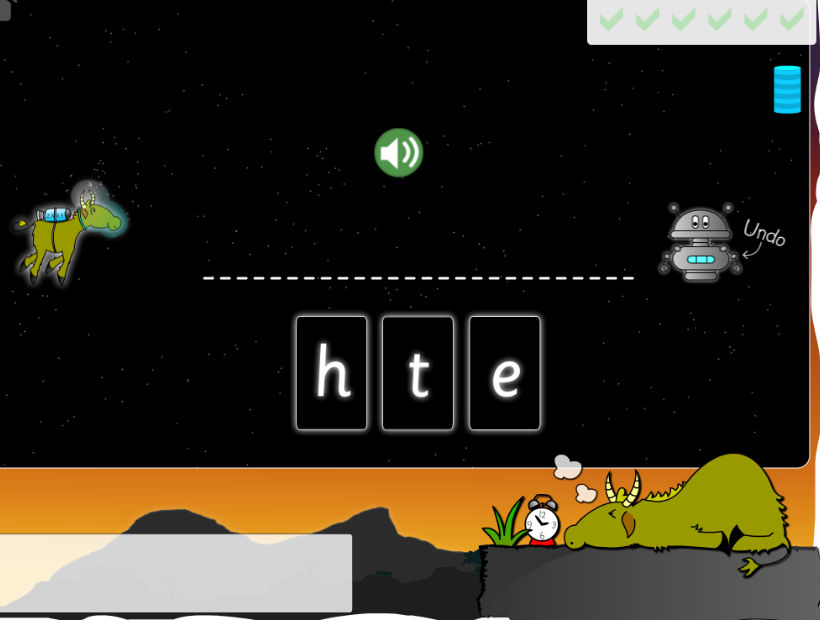
Interactive Whiteboard Lesson Plan
Overview
- Say the sound 'ee'
- Look at the unfinished words in the box
- Click and drag 'ee' sound to complete a word
- Sound out completed word
- Click and drag a 'bedtime bit' up to Tom
Context of Lesson
To complete unfinished words by adding the 'ee' long vowel phoneme
Resources Required
Interactive whiteboard, small cards (A4 pdf) showing sound 'ee' and sounds 'd, sh, k, sl, p, sw', list of words (A4 pdf) used in the game
Learning Objectives
- To recognise, read and spell the long vowel phoneme 'ee' (as in deep)
- To recognise words by common spelling patterns
Using the Reading Game
- Teacher to load 'Long Vowel Phonemes - Exploring words with the 'ee' sound' reading game on to the interactive whiteboard.
- Teacher to explain to pupils that they are going to help Tom collect everything he needs at bedtime by making some words.
If the words are correct they will be able to give Tom one of the things he likes before going to sleep.
- Teacher to choose two pupils to come to the front of the class to hold up the cards 'ee' and 'p' (A4 pdf). Blend sounds to make 'eep'.
- Teacher to give out sound cards 'd, sh, k, sl and sw' (A4 pdf), to selected pupils and ask them to take turns to bring their card and stand beside 'eep' to make another word.
- Encourage whole class to sound out each word as it is made.
- Once the above has been completed teacher to begin game and model clicking and dragging 'ee' up to the box to make a word.
- Teacher to then select pupils to continue the game until all 16 words have been correctly completed. Ensure that class sound out each word as the 'ee' sound is inserted.
- At the end of the reading game ask pupils if they can suggest any other 'ee' words that are not in Tom's game. Teacher to scribe
these on whiteboard.
- PLENARY: Show pupils enlarged list of words (A4 pdf) from the game and ask them to make a 'silly sentence' including some of these words e.g. 'The green sheep had a cheese sweet which made her sneeze.'
Literacy Homework
Pupils to write three more 'ee' words that were not in Tom's reading game.
[back to top]
Individual Computer / Computer Suite Lesson Plan
Overview
- Say the sound 'ee'
- Look at the unfinished words in the box
- Click and drag 'ee' sound to complete a word
- Sound out completed word
- Click and drag a 'bedtime bit' up to Tom
Context of Lesson
To complete unfinished words by adding the 'ee' long vowel phoneme
Resources Required
Interactive whiteboard, individual computers, small card (A4 pdf) showing 'ee' sound, list of words (A4 pdf) used in the game, homework sheet (A4 pdf), drawing programme
Learning Objectives
- To recognise, read and spell the long vowel phoneme 'ee' (as in deep)
- To recognise words by common spelling patterns
Using the Reading Game
- Teacher to load 'Long Vowel Phonemes - Exploring words with the 'ee' sound' reading game on to the interactive whiteboard.
- Teacher to explain to pupils that they are going to help Tom collect everything he needs at bedtime by making some words.
If the words are correct they will be able to give Tom one of the things he likes before going to sleep.
- Teacher to hold up small card (A4 pdf) showing 'ee' sound and ask class to generate some words that might have an 'ee' sound in the middle.
- When several words have been given teacher to begin game and model clicking and dragging 'ee' up to the box to make a word.
- Tell pupils that they are now going to play the game and see how many of the words they generated are in it.
- Pupils to play either in pairs, or individually, depending on number of computers available.
- Teacher to remind pupils that they must sound out each word they make as they go through the game.
- Teacher and teaching assistant to move around all computers to ensure that the game is being played correctly, and that the
pupils are sounding out the words.
- Any pupils that complete the game quickly could move on to a drawing programme and draw some pictures of words containing
the sound 'ee', e.g. a tree, a bee, a sheep etc. Teaching assistant could assist these pupils to access the appropriate drawing
programme on their computer.
- PLENARY: Ask pupils who have been drawing to say what they have drawn. Pupils to call out some of the 'ee' words they can remember from the game. Teacher to write these on board and count how many they have remembered.
Literacy Homework
To finish prepared homework sheet (A4 pdf) by adding 'ee' to complete each word.
[back to top]